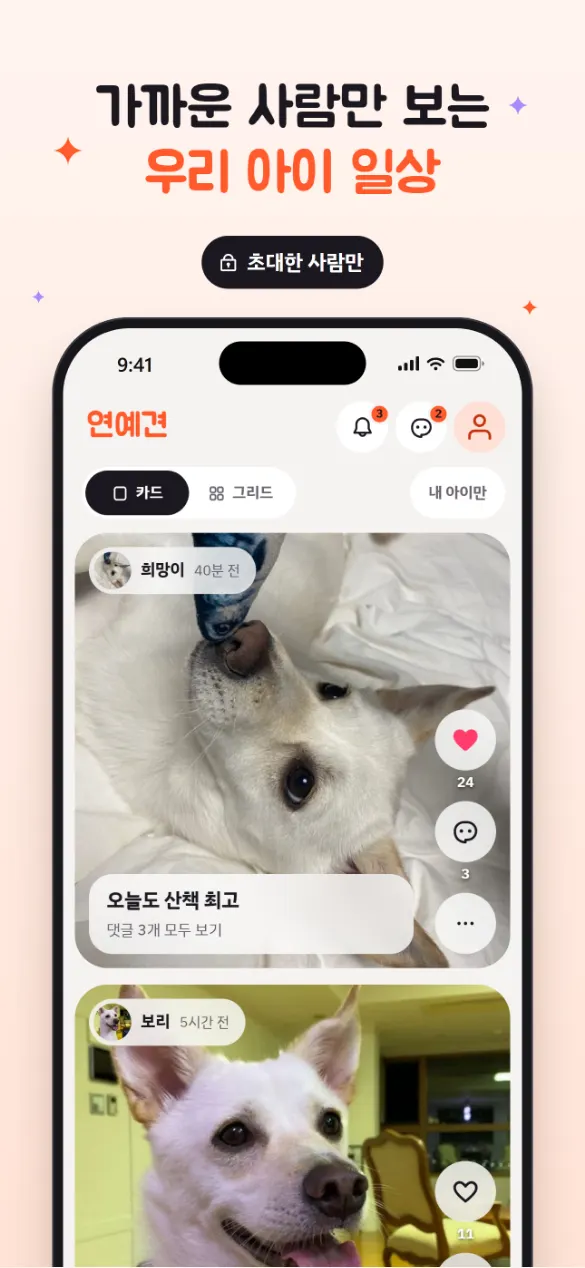
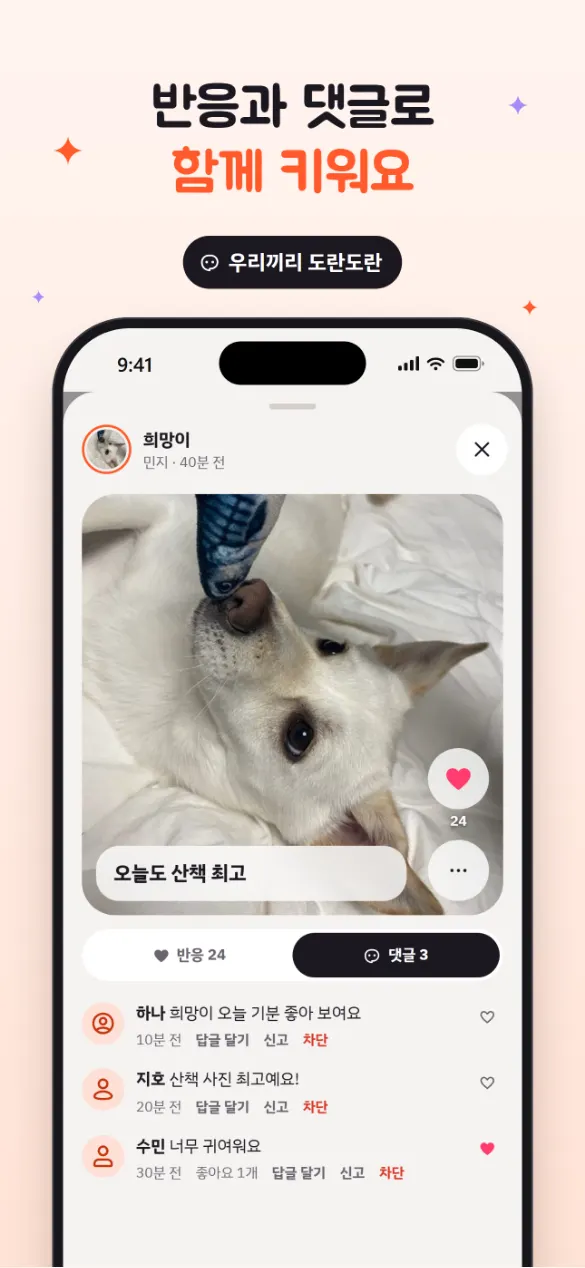
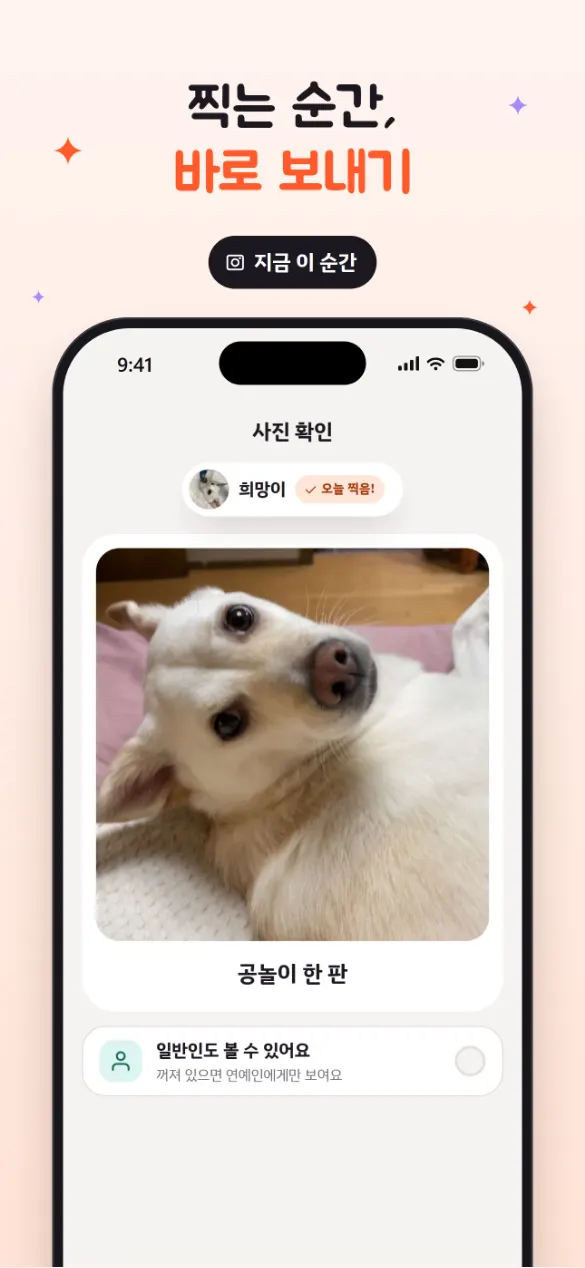
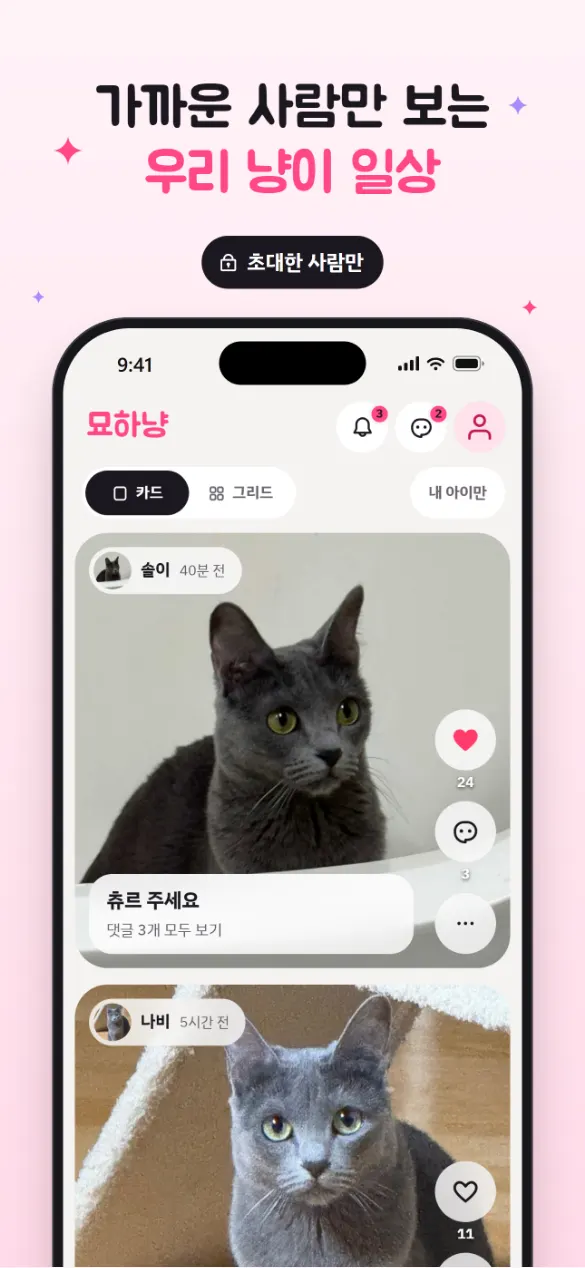
연예견 피드 (App Store 스크린샷, 예시 데이터)반응과 댓글찍고 바로 보내기묘하냥 피드
플랫폼
iPhone 앱, 웹 (위젯과 푸시 알림은 iPhone 앱에서만)
가격
무료. 유료 결제 기능이 없어요.
로그인
이메일, Google, 카카오, Apple(iPhone 앱)
언어
한국어, English
이용 연령
만 14세 이상
어떤 서비스인가요
이름은 ‘연예인’과 ‘견(犬)’을 합친 말이에요. 우리 아이가 주인공인 작은 무대에, 아이를 아끼는 사람들만 관객으로 들어와요. 관계는 아이마다 두 가지 등급으로 나뉘어요.
연예인: 주인과 가족이에요. 사진과 영상을 올리고, 모든 게시물을 보고, 연예인끼리 채팅할 수 있어요.
일반인: 초대받은 친구예요. 보고, 하트를 누르고, 댓글을 달 수 있어요.
한 사람이 어떤 아이에게는 연예인, 다른 아이에게는 일반인일 수 있어요. 공개 검색이나 모르는 사람에게 보이는 피드는 없어요.
연예견과 묘하냥은 뭐가 다른가요
기능은 똑같아요. 연예견은 코랄색, 묘하냥은 캔디 핑크색이고, 앱 이름과 로고, 안내 문구가 강아지와 고양이에 맞춰져 있어요. 계정 하나로 두 앱에 모두 로그인할 수 있고, 아이와 멤버 목록은 앱마다 따로 관리돼요. 강아지와 고양이를 함께 키운다면 두 앱을 같이 써도 돼요.
주요 기능
찍고 바로 보내기셔터를 탭하면 사진, 길게 누르면 영상이에요. 한마디를 적고 “보내기”를 누르면 끝. 새 게시물은 기본적으로 연예인(가족)에게만 보이고, “일반인도 볼 수 있어요”를 켜면 초대한 친구들에게도 보여요.
피드카드 보기와 그리드 보기를 오가고, “내 아이만” 필터로 우리 아이만 모아 볼 수 있어요. 두 번 탭하면 하트, 댓글에는 답글과 멘션을 달 수 있어요.
초대 코드설정의 초대하기에서 등급(함께 올리는 사람 / 팔로워)을 고르고 6자리 코드를 만들어요. 코드는 10분이 지나면 만료돼서, 아무 데나 퍼져도 오래 쓸 수 없어요.
iPhone 위젯홈 화면에 우리 아이 사진 위젯(작은·중간·큰 크기, 큰 위젯은 사진 1장 또는 4장)과 “바로 촬영” 위젯을 둘 수 있어요. 잠금 화면 카메라 바로가기(iOS 16 이상)와 제어 센터·동작 버튼(iOS 18 이상)도 지원해요.
아이 목소리 알림그날 아이 사진이 아직 없으면 저녁 8시에 “{아이 이름}의 사진을 찍어주세요! 🐾” 알림이 와요. 알림 설정에서 끌 수 있어요.
여러 아이, 공동 주인우리 아이 관리에서 이름·품종·생일·한 줄 소개와 사진으로 아이를 여러 마리 등록할 수 있어요. 함께 키우는 가족은 연예인으로 초대하면 돼요.
가족 채팅아이마다 연예인끼리 쓰는 채팅방이 있어요. 사진과 영상, 답장, 읽음 표시를 지원해요.
신고와 차단문제가 되는 사람이나 게시물은 신고·차단할 수 있고, 신고는 24시간 안에 검토해요.
이렇게 시작해요
우리 아이를 등록할 때
앱을 열고 “시작하기” → “우리 아이 등록 — 내가 주인이에요”를 골라요.
아이 사진과 이름, 품종, 생일, 한 줄 소개를 넣고 “등록”을 눌러요. 여러 마리라면 더 추가해요.
“다음”을 누르면 가입 화면이 나와요. 이메일이나 Apple·Google·카카오로 가입하고, 내 프로필(이름, 한 줄 소개)을 만들면 피드로 들어가요.
설정의 초대하기에서 가족과 친구에게 보낼 코드를 만들어요.
초대를 받았을 때
“시작하기” → “초대 코드로 팔로우 — 친구네 아이를 봐요”를 골라요.
받은 6자리 코드를 넣으면 “{아이 이름} 찾음! 🎉”이 뜨고, “팔로우”를 누른 뒤 가입해요.
주인이 받아 주면 “입장하기”로 아이의 피드에 들어가요.
자주 묻는 질문
누가 우리 아이 사진을 볼 수 있나요?
그 아이의 멤버로 들어온 사람만 볼 수 있어요. 새 게시물은 기본적으로 연예인(가족)에게만 보이고, 올릴 때 “일반인도 볼 수 있어요”를 켜야 친구들에게도 보여요. 공개 검색이나 전체 공개 피드는 없어요.
위젯은 어떻게 추가하나요?
iPhone 홈 화면을 길게 눌러 위젯 목록에서 연예견(또는 묘하냥)을 찾아 추가해요. 어떤 아이를, 어떤 순서(최신·랜덤·고정)로 보여 줄지는 앱의 설정 → 위젯에서 정해요. 바뀐 내용이 위젯에 보이기까지 최대 30분쯤 걸릴 수 있어요. iOS가 위젯 새로고침 횟수를 정하기 때문이에요.
매일 오는 알림을 끄고 싶어요.
설정 → 알림 설정 → 사진 찍기 알림을 끄면 돼요.
게시물이나 계정은 어떻게 지우나요?
게시물은 ⋯ → 삭제로 지워요. 계정은 내 프로필 → 회원탈퇴에서 “본인 계정만 지우기”(아이는 다른 연예인에게 넘어가요) 또는 “펫까지 지우기”를 고를 수 있어요. 다른 사람과 함께 쓰던 아이의 게시물·댓글·채팅은 이름 없이 남아요.
안드로이드 앱이 있나요?
아직 없어요. 안드로이드에서는 웹(연예견 yeonyegyeon.honeybeecook.com, 묘하냥 pawstar.honeybeecook.com)으로 쓸 수 있지만, 위젯과 푸시 알림은 iPhone 앱에서만 돼요.
한 계정으로 연예견과 묘하냥을 같이 쓸 수 있나요?
네. 같은 계정으로 두 앱에 로그인할 수 있고, 아이와 멤버는 앱마다 따로예요.
개인정보와 데이터
게시물 사진과 영상은 비공개 저장소에 있고, 그 아이의 멤버에게만 몇 시간 동안 유효한 임시 링크로 보여요. 사람과 아이의 프로필 사진은 예외로, 주소를 아는 사람은 열 수 있는 저장소에 있어요. 광고, 추적, 외부 분석 도구는 쓰지 않아요. 자세한 내용은 연예견 개인정보처리방침에 있어요.
You don’t want your pet’s photos out in public, but in the family group chat they get buried in an hour. Pupstar and Pawstar are a feed just for your pet, open only to the people you invite. Pupstar is for dogs, Pawstar for cats; the features are the same and only the name and colors differ.
Pupstar feed (App Store screenshot, sample data)Reactions and commentsShoot and sendPawstar feed
Platforms
iPhone app and web (widgets and push notifications are iPhone-only)
Price
Free, with no paid features
Sign-in
Email, Google, Kakao, Apple (iPhone app)
Languages
Korean, English
Age
14 and over
What it is
The Korean name 연예견 is a pun on 연예인 (celebrity) and 견 (dog): your pet is the star of a small stage, and only the people who love them get a seat. Each pet has two kinds of members:
Stars (연예인): owners and family. They post photos and videos, see everything, and chat with each other.
Fans (일반인): invited friends. They view, heart and comment.
One person can be a star for one pet and a fan of another. There is no public search and no feed for strangers.
Pupstar vs Pawstar
The features are identical. Pupstar is coral and Pawstar is candy pink, and the names, logos and wording fit dogs or cats. One account signs in to both apps, and each app keeps its own pets and members, so a home with both a dog and a cat can use both.
Features
Shoot and sendTap the shutter for a photo, hold it for video, add a line and send. New posts go to stars (family) only by default; switch on sharing with fans to show them to invited friends too.
The feedSwitch between card and grid views, or filter to just your own pet. Double-tap to heart; comments take replies and mentions.
Invite codesPick a role (co-poster or follower) and make a 6-character code. Codes expire after 10 minutes, so a code that gets passed around stops working quickly.
iPhone widgetsPut your pet on the home screen in small, medium or large sizes (the large one shows one photo or four), plus a quick-camera widget, a lock-screen camera shortcut (iOS 16+) and a Control Center / Action Button control (iOS 18+).
Reminders in your pet’s voiceIf there’s no photo of your pet yet that day, an 8 p.m. reminder asks, in their voice, for you to take one. You can turn it off.
Several pets, several ownersAdd as many pets as you have, each with a name, breed, birthday, one-line intro and photo. Invite co-owners as stars.
Family chatEach pet has a chat for its stars, with photos, videos, replies and read receipts.
Reporting and blockingReport or block people and posts; reports are reviewed within 24 hours.
Getting started
Registering your pet
Open the app, tap Start, and choose to register your pet as its owner.
Add a photo, name, breed, birthday and a one-line intro, and save. Add more pets if you have them.
Tap Next to sign up with email, Apple, Google or Kakao, make your profile, and you’re in the feed.
Use Invite in settings to make codes for family and friends.
When you’re invited
Tap Start and choose to follow with an invite code.
Enter the 6-character code, tap Follow when your friend’s pet appears, and sign up.
Once the owner lets you in, tap Enter to see the feed.
FAQ
Who can see my pet’s photos?
Only that pet’s members. New posts go to stars (family) only unless you switch on sharing with fans when posting. There is no public search or public feed.
How do I add the widget?
Long-press your iPhone home screen, find Pupstar (or Pawstar) in the widget gallery and add it. Choose which pet and which order (newest, random or pinned) in the app under Settings → Widget. Changes can take up to about 30 minutes to appear, because iOS decides how often widgets refresh.
How do I turn off the daily reminder?
Settings → Notifications → photo reminder.
How do I delete a post or my account?
Delete a post from its ⋯ menu. Delete your account from your profile, choosing either your account only (your pets pass to another star) or your account and your pets. Posts, comments and chats in pets shared with others stay, without your name.
Is there an Android app?
Not yet. On Android you can use the web versions, but widgets and push notifications are iPhone-only.
Can one account use both apps?
Yes. The same account signs in to both, and each app keeps its own pets and members.
Privacy and data
Post photos and videos sit in private storage and are shown to the pet’s members through links that expire after a few hours. Profile pictures of people and pets are the exception: anyone who has their address can open them. There are no ads, trackers or third-party analytics. See Pupstar’s privacy policy (Korean) for details.